OFFICIAL OPERATOR USER GUIDE & 18-SCREEN VISUAL PORTAL TOUR • VERSION 2.0
See Inside Agent Right Hand: Full Screenshot Manual & Click-By-Click Product Tour
Explore every screen behind the curtain before or after you log in: all 7 Setup Wizard onboarding screens, the Left Sidebar & Project menu, the Bottom Command Bar (🎤 Voice Mic, 📎 Paperclip, 📚 Prompt Vault), all 4 Operating Rooms, all 5 System Settings screens (comparing LITE vs. PRO), and 3 real job-quoting and competitor-audit demos.
🔍
📑 MANUAL PAGE INDEX (TABLE OF CONTENTS • PAGES 1–10)
Click any page below to jump directly to that section
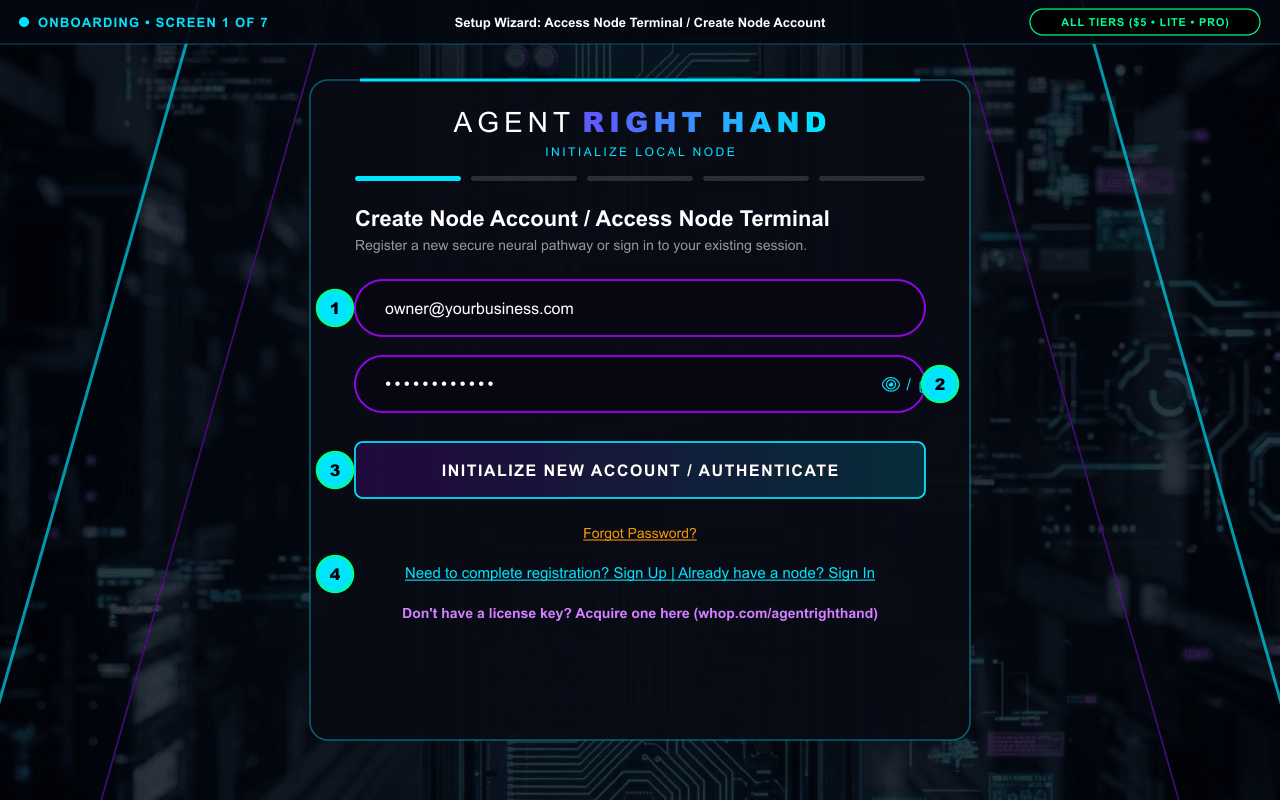
Complete Onboarding Guide: Every Setup Wizard Screen in Order (Screens 1–7)
Walk through all 7 actual Setup Wizard screens at /portal in exact chronological order, with a real full-resolution screenshot for every single screen plus how and why each step works.
📍 Exact Location in Portal: https://agentrighthand.app/portal (SetupWizard: Screens 1 through 7)
HOW TO DO IT (MATCHES GREEN NUMBERS ON SCREENSHOT ABOVE):
1Enter your business email address in the top input field.
2Enter your password (click the 👁️ / 🔒 icon on the right to show or hide your characters).
3Click "INITIALIZE NEW ACCOUNT / AUTHENTICATE" to create your account or sign in.
4Use the bottom links to switch between "Sign Up" and "Sign In", click "Forgot Password?" for an instant email reset link, or click the Whop link if you still need a license key.
Why it works this way: Creates your private, encrypted cloud workspace container so your business numbers, chats, and uploaded files are isolated strictly to your account and never used to train public AI models.
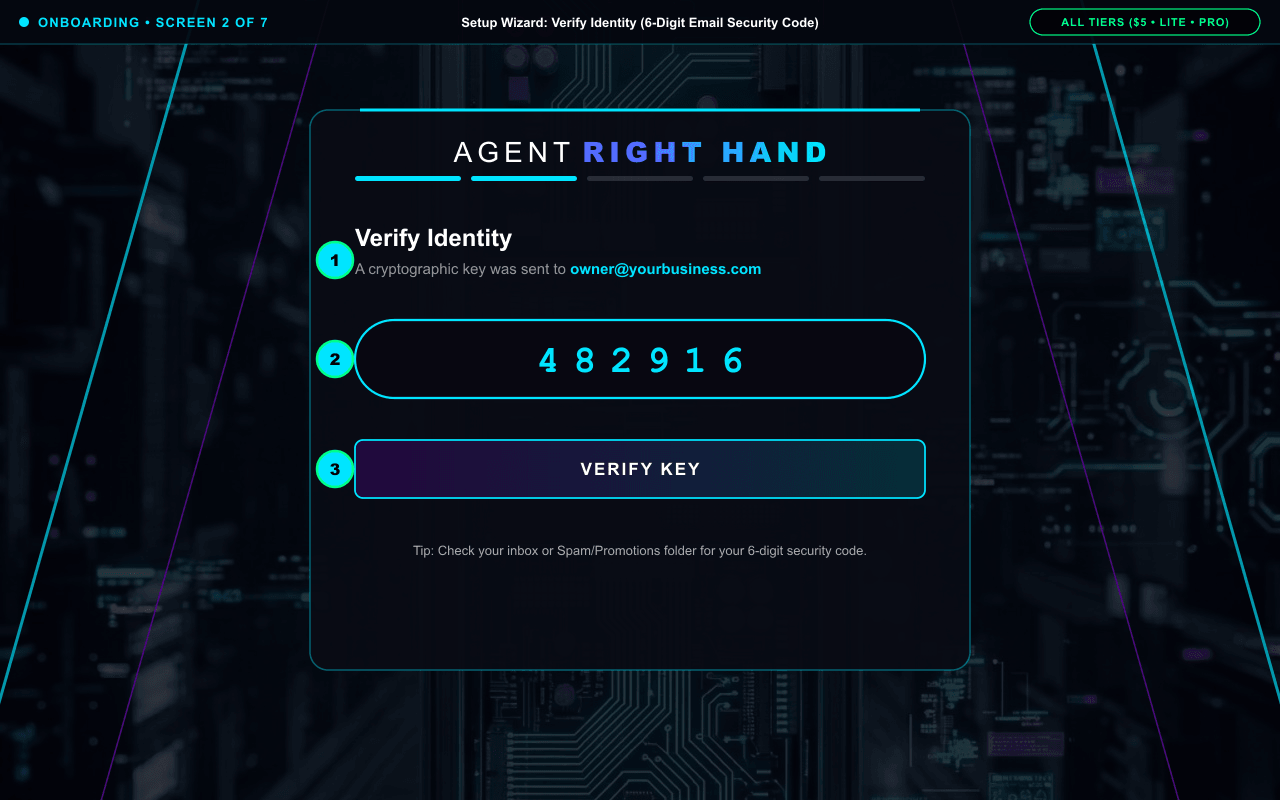
HOW TO DO IT (MATCHES GREEN NUMBERS ON SCREENSHOT ABOVE):
1Check your email inbox for the 6-digit security code sent automatically and paste or type it into the centered "PASTE CODE" box.
2Click "VERIFY KEY" to confirm your email and advance to Screen 3.
Why it works this way: Verifies that you control the email address tied to your business memory so no unauthorized party can register or access your node.
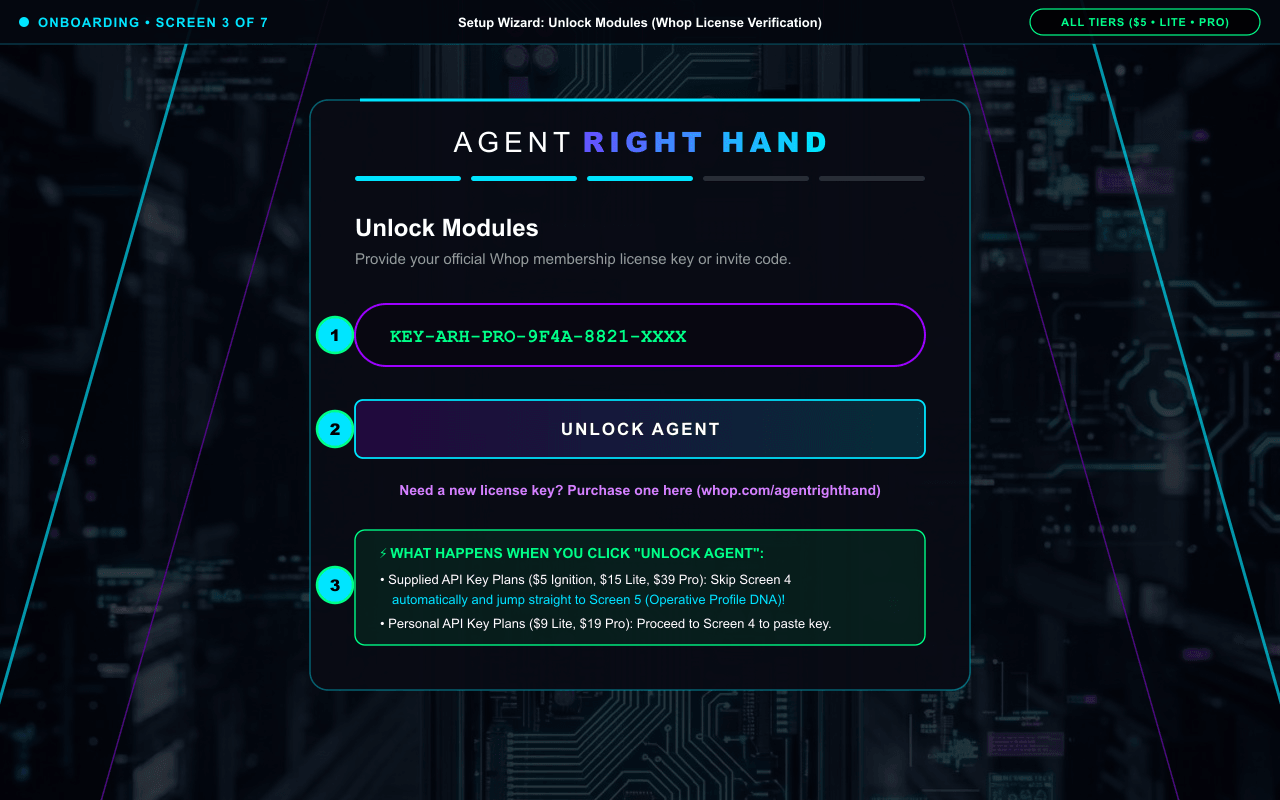
HOW TO DO IT (MATCHES GREEN NUMBERS ON SCREENSHOT ABOVE):
1Copy your official license key from your Whop receipt (or https://whop.com/hub) and paste it into "Paste License Key or Invite Code".
2Click "UNLOCK AGENT" to activate your tier.
3Need a key first? Click the bottom Whop link to grab a $5 Ignition Pass, Lite Core, or Pro Engine license.
Why it works this way: Our server verifies your exact plan ($5 Ignition Test Drive, Lite Core, or Pro Engine) and automatically routes you: Supplied API Key (Managed) users skip Screen 4 completely and jump straight to Screen 5, while Personal API Key users proceed to Screen 4.
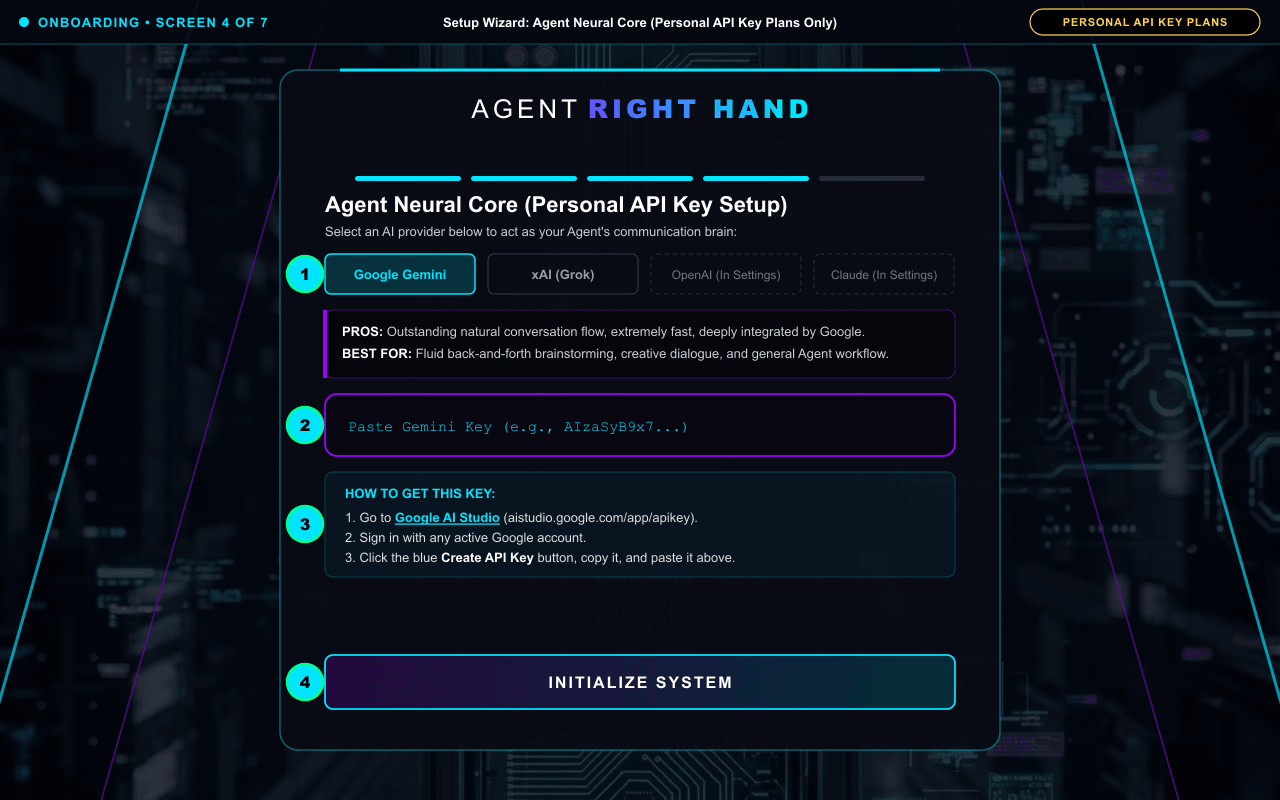
Screen 4: Screen 4: Agent Neural Core (Personal API Key Plans Only — Managed Plans Skip This!)
✓ LITE CORE & PRO ENGINE
HOW TO DO IT (MATCHES GREEN NUMBERS ON SCREENSHOT ABOVE):
1Select your AI provider button (Google Gemini or xAI Grok).
2Paste your personal provider API key into the input box.
3Need a key? Follow the built-in 3-step "HOW TO GET THIS KEY" box on screen.
4Click "INITIALIZE SYSTEM" (or optionally expand "Advanced Configuration" if you want to link a Resend email key).
Why it works this way: Supplied API Key users never see this screen because their Google Gemini processing is pre-loaded. Personal API Key users connect their own provider account here so usage bills directly to their provider with zero ARH battery limits.
⚡ LITE vs. PRO Upgrade Value: On Pro Engine, you can also link OpenAI (ChatGPT) and Anthropic (Claude) Personal API Keys inside Settings -> AI Engine and route different models to different S.W.A.R.M. departments.
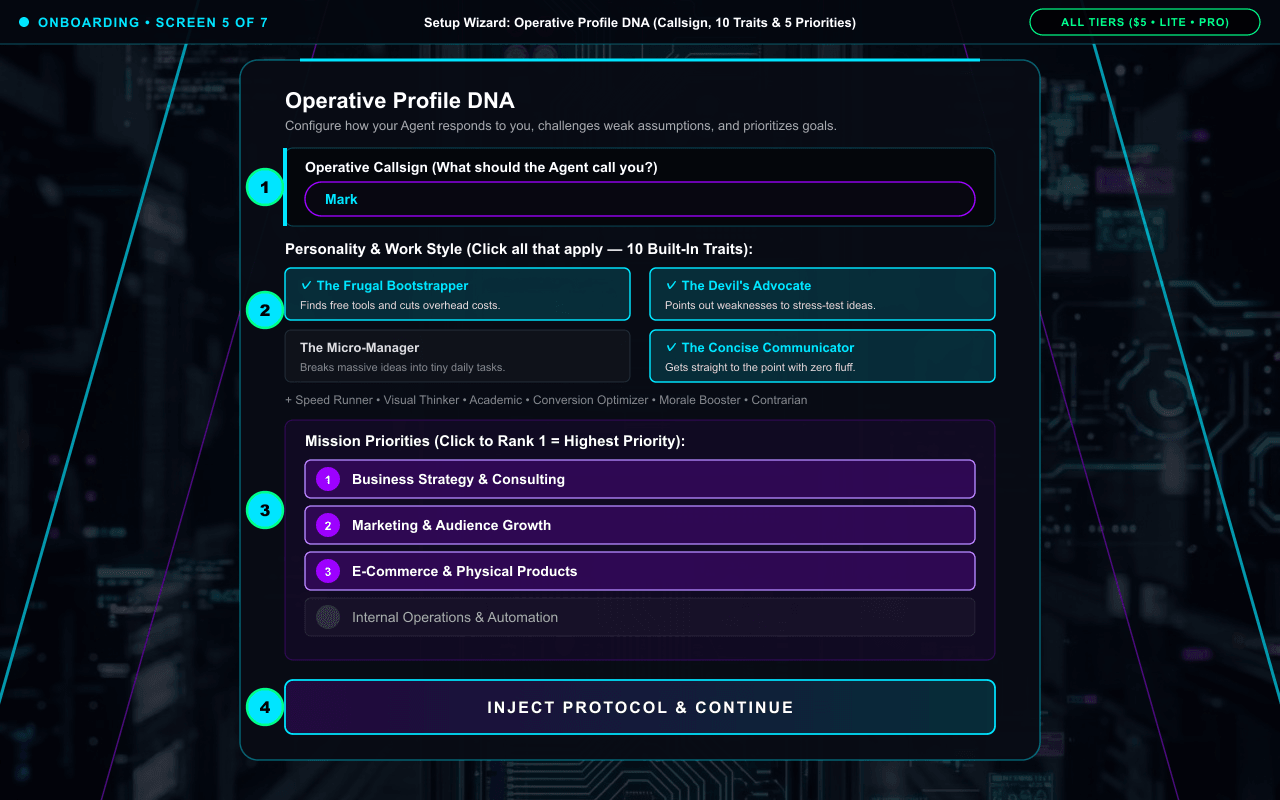
Screen 5: Screen 5: Operative Profile DNA (Callsign, 10 Work Style Traits & 5 Ranked Mission Priorities)
🟢 ALL TIERS ($5 IGNITION • LITE • PRO)
HOW TO DO IT (MATCHES GREEN NUMBERS ON SCREENSHOT ABOVE):
1Type your first name or title into "Operative Callsign".
2Click any combination of the 10 Personality & Work Style cards (The Frugal Bootstrapper, The Devil's Advocate, The Micro-Manager, The Speed Runner, The Visual Thinker, The Academic, The Concise Communicator, The Conversion Optimizer, The Morale Booster, The Contrarian).
3Click the 5 Mission Priorities in order of importance to rank them 1 through 5 (click again to unselect).
4Click "Inject Protocol & Continue". (Full Flexibility: None of these choices lock you in permanently — as your business grows or changes over time, you can update your Callsign, Coaching Style, Mission Priorities, and Stored Business Context anytime inside the Portal via chat or Settings!)
Why it works this way: Standard chatbots default to generic, flattering "yes-man" answers. Selecting traits like "The Devil's Advocate" and "The Frugal Bootstrapper" programs Agent Right Hand to challenge weak assumptions and protect your overhead from minute one — while giving you total flexibility to adjust your preferences later.
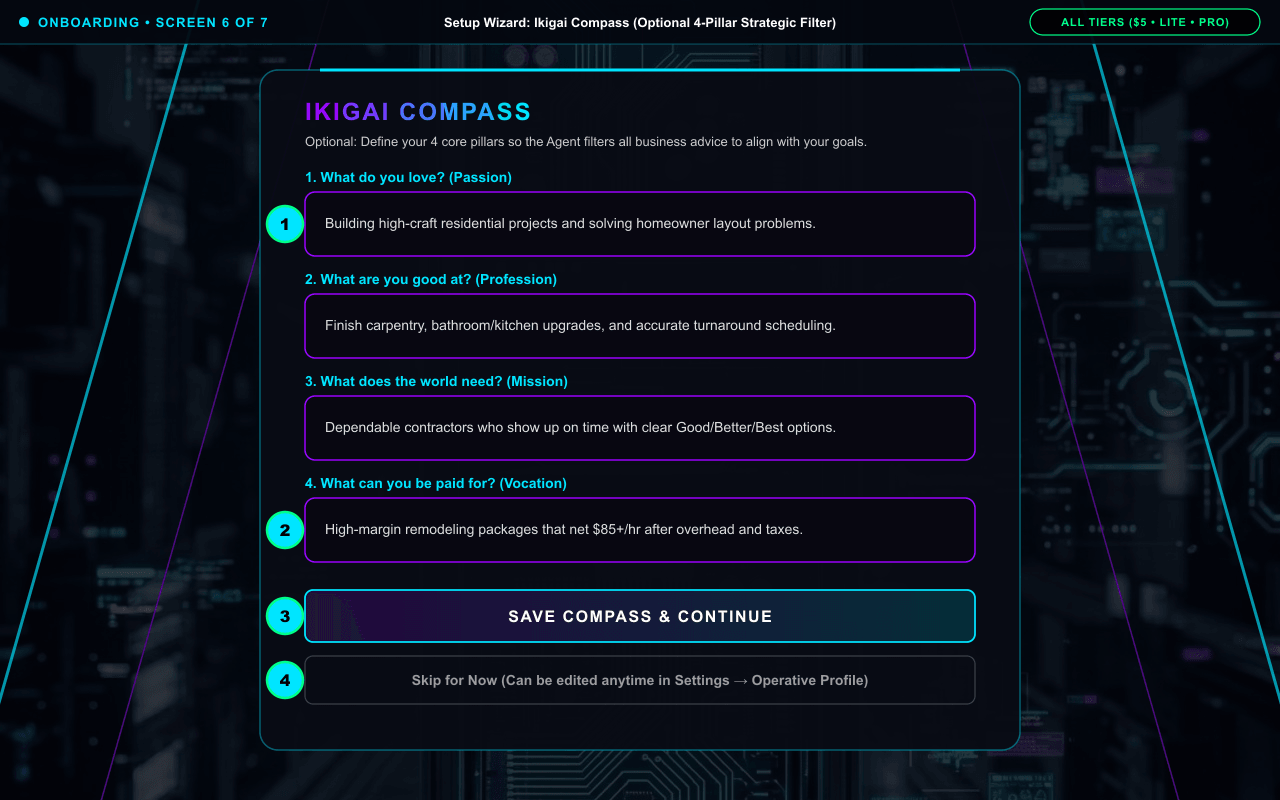
HOW TO DO IT (MATCHES GREEN NUMBERS ON SCREENSHOT ABOVE):
1Fill in the 4 optional strategic filter boxes: Passion (What do you love?), Profession (What are you good at?), Mission (What does the world need?), and Vocation (What can you be paid for?).
2Click "Save Compass & Continue" to lock in your alignment.
3Or click "Skip for Now" — you can fill out or edit your Ikigai Compass anytime later inside Settings -> Operative Profile.
Why it works this way: When completed, Agent Right Hand permanently filters its business recommendations so it never pushes you toward a business model you hate or that conflicts with your strengths.
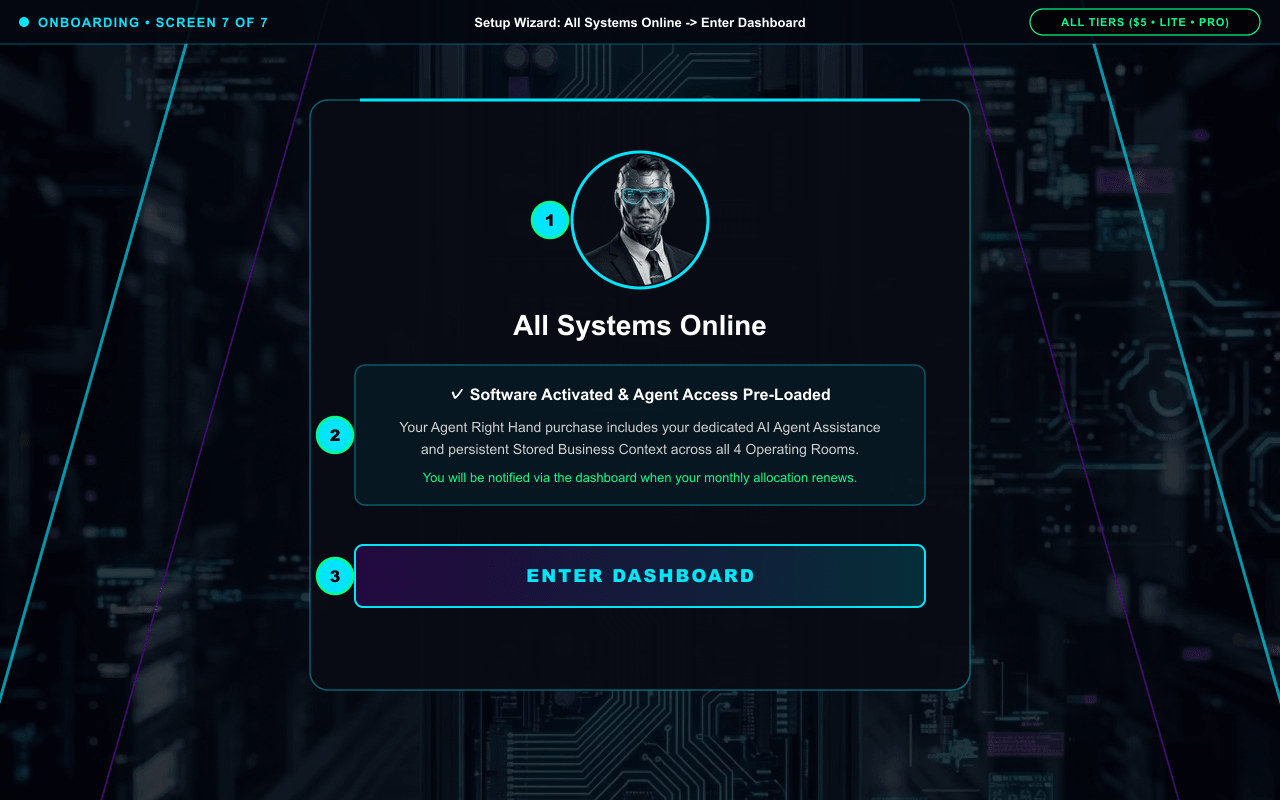
Screen 7: Screen 7: All Systems Online -> Enter Dashboard
🟢 ALL TIERS ($5 IGNITION • LITE • PRO)
HOW TO DO IT (MATCHES GREEN NUMBERS ON SCREENSHOT ABOVE):
1Confirm your Agent Right Hand avatar and glowing cyan activation ring are online.
3Click "ENTER DASHBOARD" to launch directly into your Command Center workspace.
Why it works this way: Your workspace is now live with your Callsign, Work Style DNA, and Stored Business Context active across every Operating Room.
🛠️ QUICK TROUBLESHOOTING & PRO TIPS FOR PAGE 1
Did not receive your 6-digit verification email on Screen 2? Check your Spam/Promotions folder or wait 30 seconds.
Seeing "Security Alert: Node Compromised / [ RECLAIM ACTIVE CONTROL ]"? That is Single-Active-Device protection when you switch between your phone and desktop browser. Just click "[ RECLAIM ACTIVE CONTROL ]" to transfer your active session to the current screen immediately.
Q: Why use Agent Right Hand instead of building a DIY "Project" folder in ChatGPT or Claude?
A: Most owners do not know what `.md` business context an AI needs to act as an estimator or strategist, standard chatbots act like agreeable "yes-men", and DIY Project folders lock your memory inside a single AI company. ARH pre-calibrates your DNA during onboarding and shares your memory across Gemini, ChatGPT, Claude, and Grok.
Q: How does the $5 Ignition Test Drive work, and what happens when I upgrade?
A: For a one-time $5 (no recurring subscription), you get up to 50+ strategy sessions (~500,000 words on Gemini 2.5 Flash) with full onboarding, Stored Business Context, Voice Mic (🎤), and Paperclip uploads (📎). Upgrading to Lite or Pro preserves 100% of your profile and chat history.
Agent Right Hand Official Operator Manual • Technology by WBMB Inc.Page 1 of 10
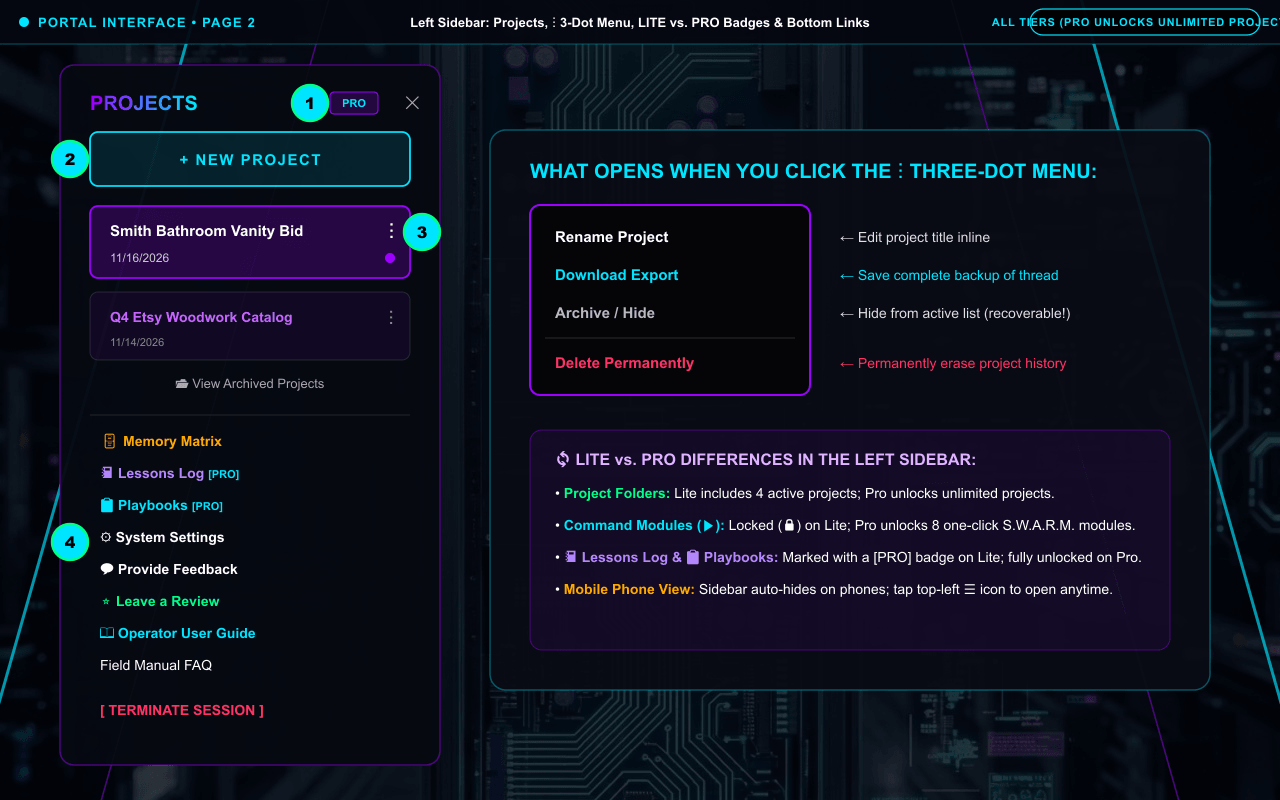
Command Center Overview: Left Sidebar, Project 3-Dot Menu (⋮), and Mobile Menu (☰)
Visual screenshot guide to every button in the Left Sidebar: creating new projects, using the ⋮ 3-dot project menu, viewing archived projects, and seeing how LITE vs. PRO badges appear.
📍 Exact Location in Portal: Left Sidebar Panel (Desktop) or Top-Left ☰ Hamburger Menu Button (Mobile)
✦
PRO / LITE Tier Badge & ☰ Menu
Top of sidebar shows your active LITE or glowing purple/cyan PRO badge.
✦
+ NEW PROJECT Button
Cyan bracketed button creates a fresh Project workspace with all 4 Operating Rooms.
✦
Project Card & ⋮ 3-Dot Menu
Click ⋮ on any project card to Rename, Download Export, Archive/Hide, or Delete.
✦
Bottom Navigation Links
Quick access to Memory Matrix, Lessons Log, Playbooks, System Settings, Feedback, Reviews & Guide.
SCREEN-BY-SCREEN INSTRUCTIONS (NUMBERS ①–④ MATCH THE SCREENSHOT MARKERS)
Screen Walkthrough: Create Projects (+ NEW PROJECT), Use the ⋮ 3-Dot Menu & Navigate Bottom Tools
🟢 ALL TIERS ($5 IGNITION • LITE • PRO)
HOW TO DO IT (MATCHES GREEN NUMBERS ON SCREENSHOT ABOVE):
1Check the top "PROJECTS" header to see your active LITE or glowing PRO tier badge (and tap ☰ in the top-left on mobile to open or ✕ to close the sidebar).
2Click "+ NEW PROJECT" to create a dedicated workspace folder for a job or client.
3Click the vertical three dots (⋮) on any Project card to open the dropdown menu (Rename Project, Download Export, Archive / Hide, or Delete Permanently — plus click "📂 View Archived Projects" below the list to restore hidden folders).
4Use the bottom navigation links to open 🗄️ Memory Matrix, 📓 Lessons Log, 📋 Playbooks, ⚙ System Settings, 💬 Provide Feedback, ⭐ Leave a Review, or 📖 Operator User Guide.
Why it works this way: Keeps each job or campaign in its own clean folder while still sharing your master Stored Business Context across every project.
⚡ LITE vs. PRO Upgrade Value: Lite Core includes 4 active project folders; upgrading to Pro Engine unlocks unlimited custom project folders plus 📓 Lessons Log, 📋 Playbooks, and 8 one-click Command Modules.
🛠️ QUICK TROUBLESHOOTING & PRO TIPS FOR PAGE 2
Cannot see the left sidebar on your phone? Tap the ☰ icon in the top-left corner of the screen.
Accidentally archived a project? Click "📂 View Archived Projects" beneath the project list to restore it.
Q: Why should I Archive a project instead of Deleting it?
A: Archiving removes a finished job or campaign from your active sidebar so your workspace stays clean, while keeping the full history safely stored in your database so you can restore it anytime. Deleting permanently erases that thread.
Q: What happens to my projects and data if my computer goes to sleep, or if I pause/cancel my subscription?
A: Your projects and Stored Business Context live 24/7 in the cloud across desktop and phone browsers, and we never penalize you by auto-deleting your data if you pause or cancel your monthly retainer.
Agent Right Hand Official Operator Manual • Technology by WBMB Inc.Page 2 of 10
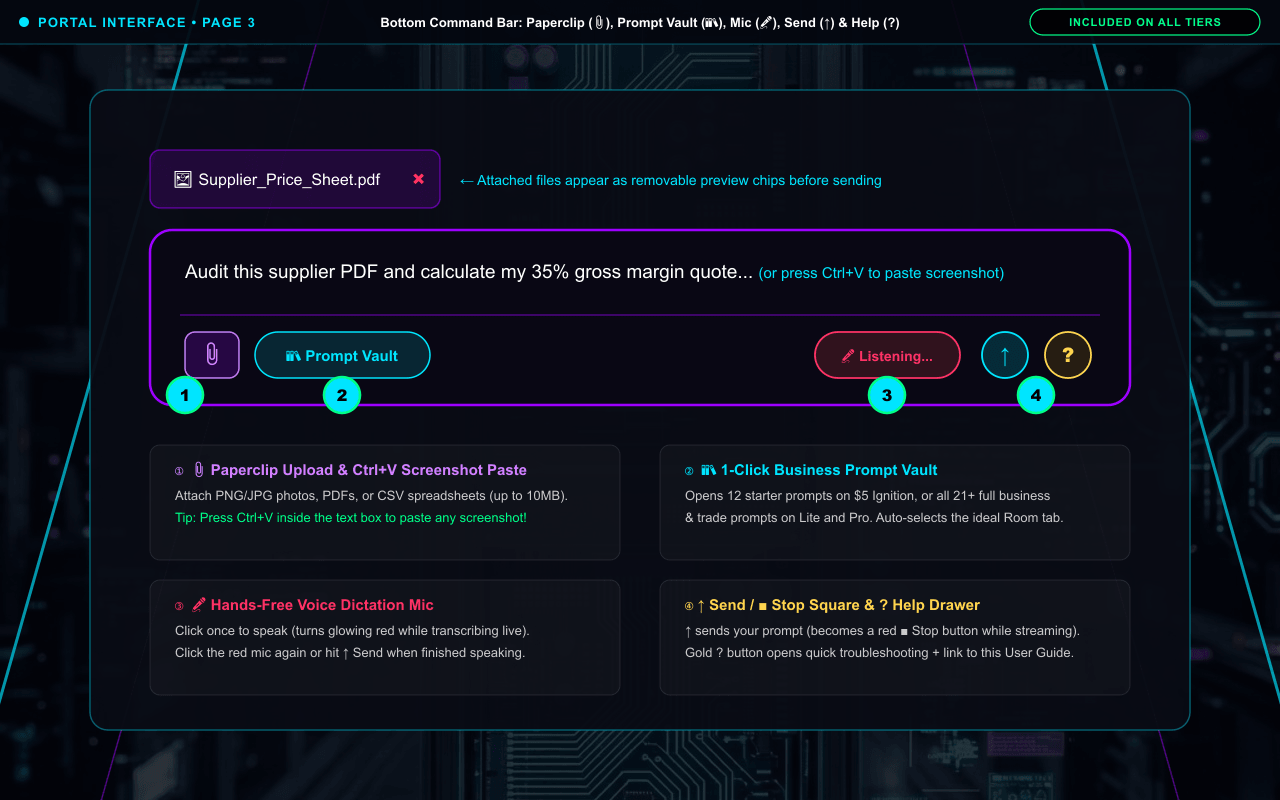
Bottom Command Bar: Paperclip (📎), Prompt Vault (📚), Voice Mic (🎤), Send (↑), and Help (?)
Visual screenshot walkthrough of every icon inside the bottom input pill, showing exactly what happens when you attach files, open the Prompt Vault, dictate by voice, or open the Help drawer.
📍 Exact Location in Portal: Bottom center of the main chat panel inside the glowing purple/cyan input pill.
Bottom-right cyan mic icon: click once to speak (glows red while listening), click again when done.
✦
↑ Send / ■ Stop & ? Help
Cyan Up-Arrow sends your message (turns into red ■ Stop while generating); gold ? opens Help.
SCREEN-BY-SCREEN INSTRUCTIONS (NUMBERS ①–④ MATCH THE SCREENSHOT MARKERS)
Screen Walkthrough: Use 📎 Paperclip Upload, 📚 Prompt Vault, 🎤 Voice Dictation & ? Help in the Bottom Pill
🟢 ALL TIERS ($5 IGNITION • LITE • PRO)
HOW TO DO IT (MATCHES GREEN NUMBERS ON SCREENSHOT ABOVE):
1Click the purple 📎 icon (or press Ctrl+V) to attach photos, screenshots, PDFs, or CSVs — they appear as a removable preview chip above the box.
2Click "📚 Prompt Vault" to pick a ready-made business prompt.
3Click the 🎤 microphone icon to speak hands-free (it glows red while transcribing).
4Click ↑ to send (or ■ Stop while streaming), or click the gold "?" button for instant help.
Why it works this way: Every core input method (voice dictation, file/photo upload, and clipboard screenshot paste) is included on all tiers ($5 Ignition, Lite, and Pro).
⚡ LITE vs. PRO Upgrade Value: $5 Ignition includes 12 starter prompts in the Prompt Vault; Lite and Pro unlock all 21+ prompts, and Pro adds Spoken Audio Read-Aloud (🔊 PLAY AUDIO) on Agent replies.
🛠️ QUICK TROUBLESHOOTING & PRO TIPS FOR PAGE 3
Microphone (🎤) not turning red? Click the Lock/Permissions icon on the left side of your browser address bar, set Microphone to "Allow", and refresh (F5).
Want Agent Right Hand to read its replies out loud to you (🔊 PLAY AUDIO)? See Page 6 & Page 7 for enabling Spoken Audio on Pro Engine.
Q: How do I finish recording when using the 🎤 Microphone button?
A: Click the 🎤 icon once to start speaking (it glows red while transcribing your words into the box). When you are finished speaking, either click the glowing red mic a second time to stop listening, or simply click the ↑ Send button!
Q: Are files uploaded via the 📎 Paperclip stored temporarily or permanently?
A: Session Paperclip attachments (like a 500-row Etsy CSV or invoice PDF) are processed temporarily for your current conversation without permanently storing raw customer files on disk, while key business facts you want remembered are saved to your editable Stored Business Context.
Agent Right Hand Official Operator Manual • Technology by WBMB Inc.Page 3 of 10
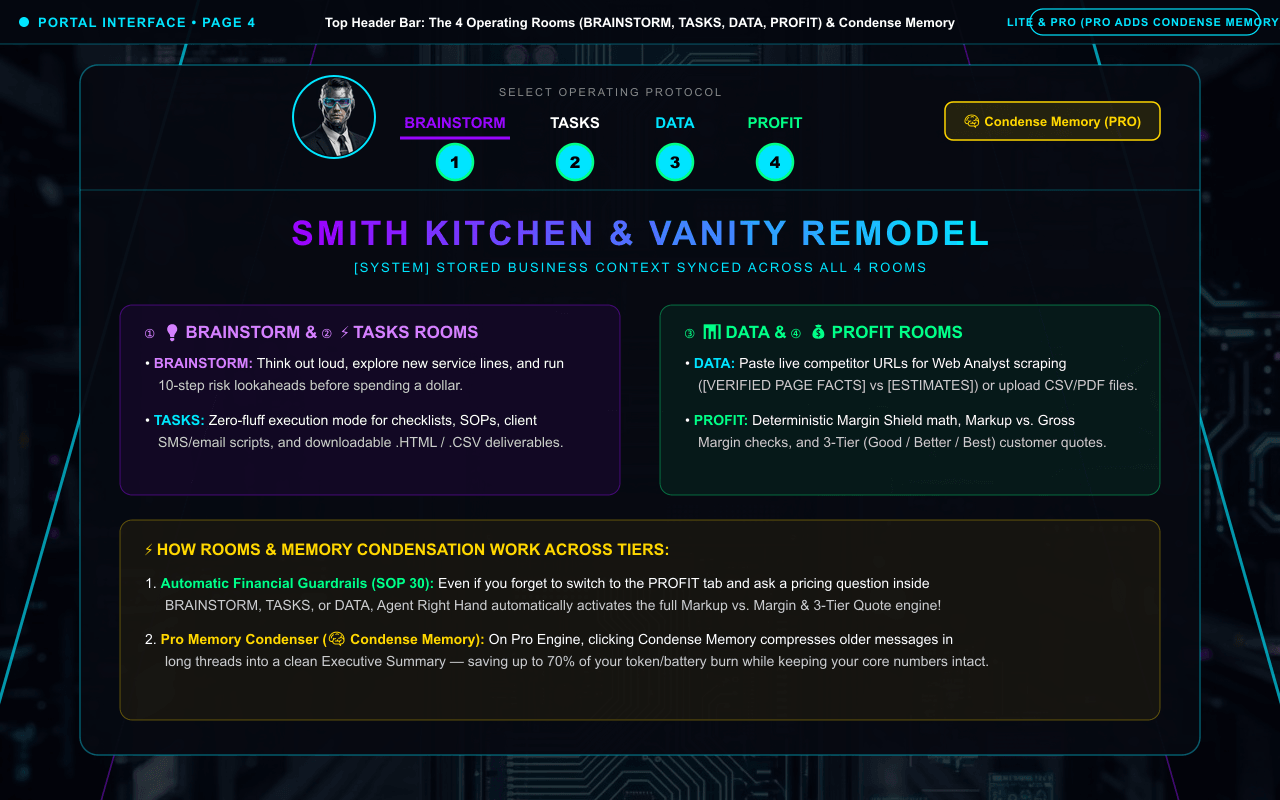
Visual screenshot guide to the top header bar of the chat workspace: switching between the 4 Operating Rooms, triggering the 4-Step Business Coaching Engine & 8 Frameworks, and using the Pro Memory Condenser.
📍 Exact Location in Portal: Top Header Bar of the main chat panel.
Zero-fluff execution checklists, SOPs, scripts, and downloadable HTML/CSV files.
✦
DATA Room Tab
Drop competitor URLs, articles, CSVs, and PDFs for live extraction and indexing.
✦
PROFIT Room Tab & Condense Memory
Deterministic Margin Shield math & 3-tier quotes + Pro 1-Click Memory Condenser.
SCREEN-BY-SCREEN INSTRUCTIONS (NUMBERS ①–④ MATCH THE SCREENSHOT MARKERS)
Screen Walkthrough: Switch Between BRAINSTORM, TASKS, DATA, and PROFIT + Use Condense Memory (PRO)
✓ LITE CORE & PRO ENGINE
HOW TO DO IT (MATCHES GREEN NUMBERS ON SCREENSHOT ABOVE):
1Click "BRAINSTORM" for the 4-Step Business Coaching Engine, 8 Strategic Frameworks (SWOT, 90-Day Sprint, Moat Audit), and 10-step risk lookaheads.
2Click "TASKS" for zero-fluff checklists, scripts, SOPs, and downloadable .HTML/.CSV files.
3Click "DATA" to drop competitor URLs, articles, CSVs, and PDFs for live server-side extraction.
4Click "PROFIT" for deterministic Markup vs. Gross Margin audits and 3-Tier (Good / Better / Best) customer quotes — or click "🧠 Condense Memory" (Pro) in the top-right header to compress long threads.
Why it works this way: Each room keeps its own clean scroll while sharing your Stored Business Context — and SOP 30 automatically enforces full financial math even if you ask a pricing question inside Brainstorm, Tasks, or Data!
⚡ LITE vs. PRO Upgrade Value: $5 Ignition includes the foundational Brainstorm room; Lite and Pro unlock all 4 dedicated Operating Room tabs; Pro adds the 1-Click Memory Condenser (saving up to 70% of token burn on long projects).
🛠️ QUICK TROUBLESHOOTING & PRO TIPS FOR PAGE 4
Forgot to switch to the PROFIT tab before asking to price a job? Don’t worry — SOP 30 automatically runs the full Markup vs. Margin and 3-Tier Quote engine in ANY room whenever you ask a pricing question.
Q: How does the 4-Step Business Coaching Engine work, and what 8 Strategic Frameworks can I ask for in BRAINSTORM?
A: When you ask broad strategy questions, ARH runs: 1) ASSESS (2–3 diagnostic questions), 2) DIAGNOSE (pinpoints your #1 bottleneck), 3) PRESCRIBE (one high-leverage next step), and 4) FOLLOW UP. You can also ask on-demand for: Unit Economics Check, 90-Day Sprint Plan, Business Model Canvas, SWOT Audit, Competitive Moat Analysis, 3-Tier Pricing Design, Go-To-Market Sequence, or Financial Health Check.
Agent Right Hand Official Operator Manual • Technology by WBMB Inc.Page 4 of 10
PAGE 5 • STORED BUSINESS CONTEXT, PLAYBOOKS & LESSONS LOGCategory: Memory & Pro Engine
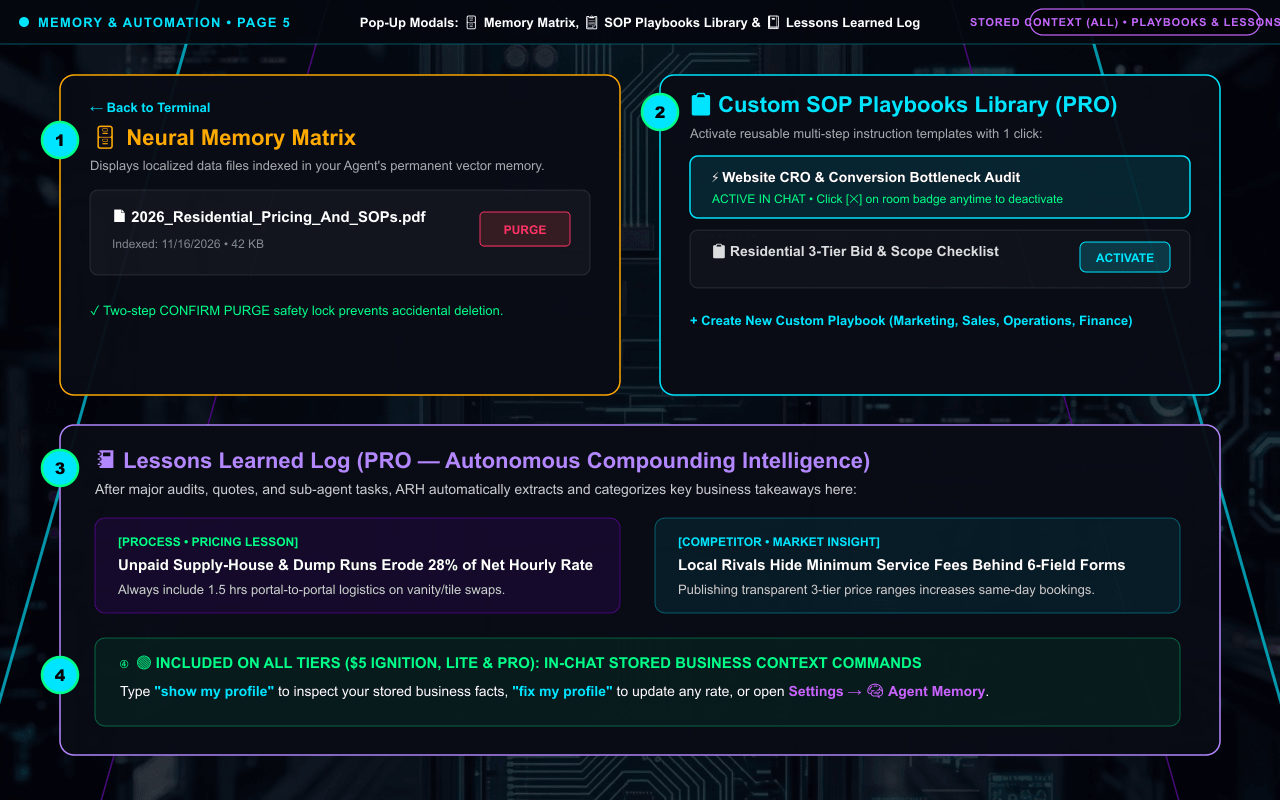
Business Memory & Automation Screens: Stored Business Context, 🗄️ Memory Matrix, 📋 Playbooks & 📓 Lessons Log
Real screenshot tour of the 🗄️ Neural Memory Matrix modal, 📋 Custom SOP Playbooks Library, 📓 Lessons Learned Log, and in-chat Stored Business Context commands.
📍 Exact Location in Portal: Bottom section of Left Sidebar (🗄️ Memory Matrix, 📓 Lessons Log, 📋 Playbooks) & Settings -> 🧠 Agent Memory.
✦
🗄️ Neural Memory Matrix Modal
View and purge permanent indexed data files in your Pro Knowledge Vault.
✦
📋 SOP Playbooks Library & Active Badge
Pro Engine: activate reusable SOP templates (shows glowing PLAYBOOK ACTIVE badge).
✦
📓 Lessons Learned Log Modal
Pro Engine: auto-populated archive of Strategy, Market, Competitor, and Process lessons.
✦
In-Chat & Settings Stored Business Context
Included on ALL tiers: auto-saves your rates, services & tone; editable anytime.
SCREEN-BY-SCREEN INSTRUCTIONS (NUMBERS ①–④ MATCH THE SCREENSHOT MARKERS)
Screen Walkthrough: Use Stored Business Context (All Tiers) + 🗄️ Memory Matrix, 📋 Playbooks & 📓 Lessons Log (PRO)
🟢 ALL TIERS ($5 IGNITION • LITE • PRO)
HOW TO DO IT (MATCHES GREEN NUMBERS ON SCREENSHOT ABOVE):
1On all tiers, ARH auto-saves your business facts as you chat ("✓ Saved to Stored Business Context..."), and you can type "show my profile" / "fix my profile" anytime.
2Click "🗄️ Memory Matrix" in the sidebar to inspect or purge permanent vector files.
3Click "📋 Playbooks" (Pro) to activate 1-click SOP templates.
4Click "📓 Lessons Log" (Pro) to review auto-captured strategic insights.
Why it works this way: Your Stored Business Context lives in your ARH cloud container — so unlike standalone chatbots, your memory stays intact even when you switch between Gemini, ChatGPT, Claude, and Grok.
⚡ LITE vs. PRO Upgrade Value: All tiers include the 2,000-character Stored Business Context profile. Upgrading to Pro unlocks permanent vector storage in 🗄️ Memory Matrix, custom 📋 Playbooks, and the autonomous 📓 Lessons Log.
🛠️ QUICK TROUBLESHOOTING & PRO TIPS FOR PAGE 5
Want to update an old price in your memory without opening a modal? Just tell ARH in chat: "Update my profile: my new service call minimum is $150."
Q: If I switch from Google Gemini to OpenAI ChatGPT, Anthropic Claude, or xAI Grok mid-project, does the new AI know what we were doing?
A: Yes, 100%! Because your project conversation, Stored Business Context, and Pro Knowledge Vault live in your shared ARH workspace container rather than inside one AI provider’s app, the new model immediately reads your current chat history and saved business profile with zero copy-pasting.
Agent Right Hand Official Operator Manual • Technology by WBMB Inc.Page 5 of 10
PAGE 6 • S.W.A.R.M. SPECIALISTS & PRO COMMAND MODULES (LITE VS. PRO)Category: Memory & Pro Engine
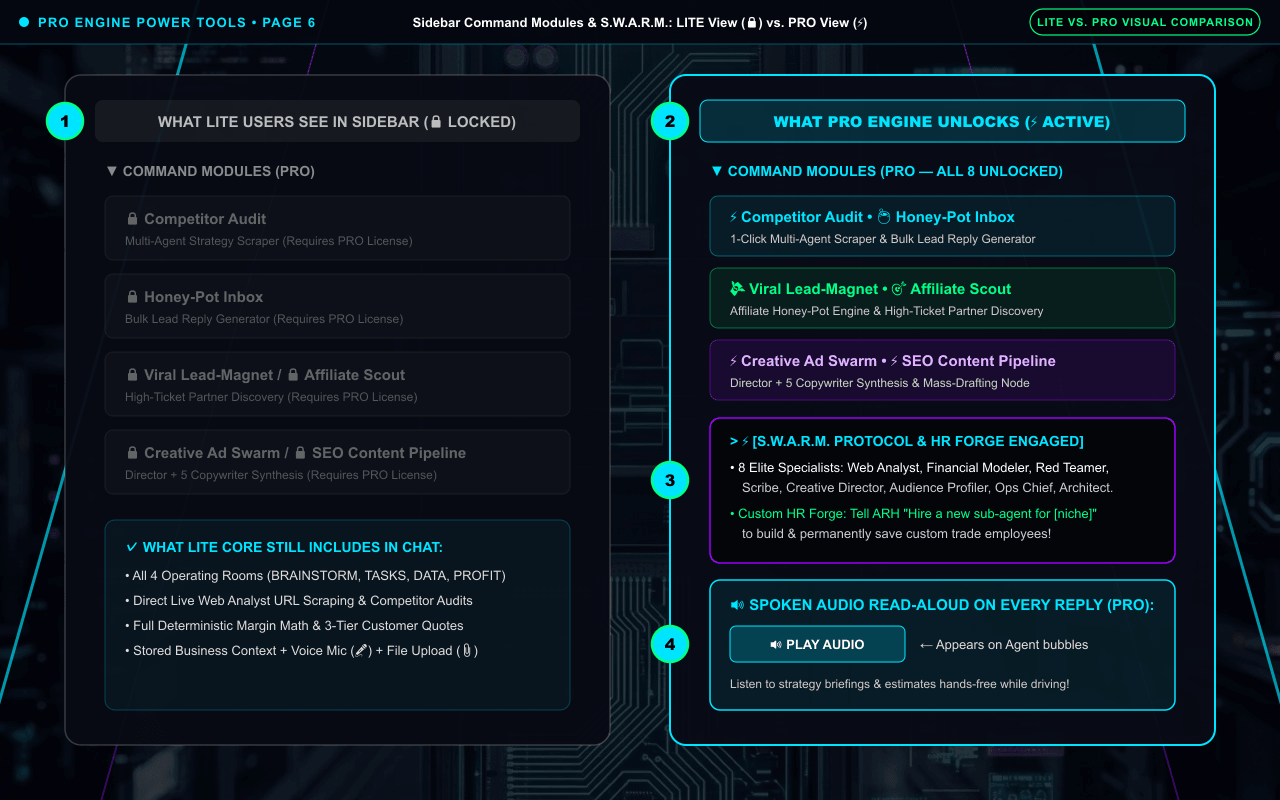
Pro Engine Power Tools: 8 S.W.A.R.M. Specialists, Custom HR Forge, Command Modules & 🔊 Audio
Side-by-side screenshot showing exactly what Lite users see (🔒 locked module cards) vs. what Pro Engine unlocks (⚡ 8 one-click Command Modules, 8 parallel S.W.A.R.M. specialists, Custom Sub-Agent HR Forge, and 🔊 PLAY AUDIO).
📍 Exact Location in Portal: Left Sidebar ("▶ COMMAND MODULES (PRO)") + In-Chat S.W.A.R.M. Delegation & Message Bubble Audio Bar.
✦
Left Column: LITE Sidebar View (🔒)
Lite shows 🔒 locked module cards while keeping all 4 rooms, Web Analyst & Profit math active in chat.
✦
Right Column: PRO Sidebar View (⚡)
Pro unlocks all 8 one-click multi-agent Command Modules in the sidebar.
✦
8 S.W.A.R.M. Specialists + Custom HR Forge
Delegates to 8 specialists and lets you hire permanent custom sub-agents in chat.
✦
🔊 PLAY AUDIO Button on Agent Replies
Pro Engine: click 🔊 PLAY AUDIO at the bottom of any Agent reply to listen hands-free.
SCREEN-BY-SCREEN INSTRUCTIONS (NUMBERS ①–④ MATCH THE SCREENSHOT MARKERS)
Screen Walkthrough: Compare LITE (🔒) vs. PRO (⚡): Command Modules, 8 S.W.A.R.M. Specialists, HR Forge & 🔊 Audio
⚡ PRO ENGINE FEATURE
HOW TO DO IT (MATCHES GREEN NUMBERS ON SCREENSHOT ABOVE):
1Left Column (LITE View): Expanding "▼ COMMAND MODULES (PRO)" on a Lite account shows 🔒 locked module cards while keeping all 4 Operating Rooms, Web Analyst, and Profit math active in chat.
2Right Column (PRO View): On Pro Engine, click any of the unlocked Command Modules (Competitor Audit, Honey-Pot Inbox, 🔨 Smart Website Estimator [Leads Inbox, Custom Multi-Industry Widget Builder with Hybrid Hourly/Flat-Rate Pricing, VIP Auto-Import from Stored Business Context, CSV/PDF/Website Ingestion, 1-Click Embed & Downloadable Print-Ready QR Codes], Viral Lead-Magnet, Affiliate Scout, Creative Ad Swarm, SEO Content Pipeline, Lead Enrichment Matrix, Live Buy-Box Shield).
3In Chat (PRO): Delegate to the 8 S.W.A.R.M. specialists in parallel or ask ARH to "hire a new sub-agent" in the Custom HR Forge.
4Audio Bar (PRO): Click "🔊 PLAY AUDIO" at the bottom of any Agent reply bubble to listen hands-free.
Why it works this way: Turns Agent Right Hand from a single-agent advisor into an 8-specialist executive team that can research, model finances, write copy, and red-team your ideas in parallel.
⚡ LITE vs. PRO Upgrade Value: Upgrading from Lite to Pro unlocks all 8 sidebar Command Modules, the 8 S.W.A.R.M. specialists, unlimited Custom Sub-Agents in the HR Forge, and spoken audio playback while preserving 100% of your existing projects and memory.
🛠️ QUICK TROUBLESHOOTING & PRO TIPS FOR PAGE 6
Clicking a Command Module shows "This Module requires a PRO License to access"? That module is part of the Pro Engine tier — you can upgrade anytime while keeping 100% of your projects and Stored Business Context.
Q: Why do S.W.A.R.M. commands use more Energy than a regular chat message?
A: A single chat message is 1 AI transaction, whereas a S.W.A.R.M. command spawns multiple specialists in parallel (e.g., Web Analyst scrapes a site -> Red Teamer stress-tests flaws -> Scribe drafts copy -> Boss Agent audits the result). That is why Pro Managed plans include ~4 million words/mo of capacity (and why heavy daily agencies can also link a Personal API Key).
Agent Right Hand Official Operator Manual • Technology by WBMB Inc.Page 6 of 10
PAGE 7 • ALL 5 SYSTEM SETTINGS SCREENS (LITE VS. PRO)Category: Memory & Pro Engine
⚙ System Settings Complete Screen Map: All 5 Tabs & LITE vs. PRO Differences Explained
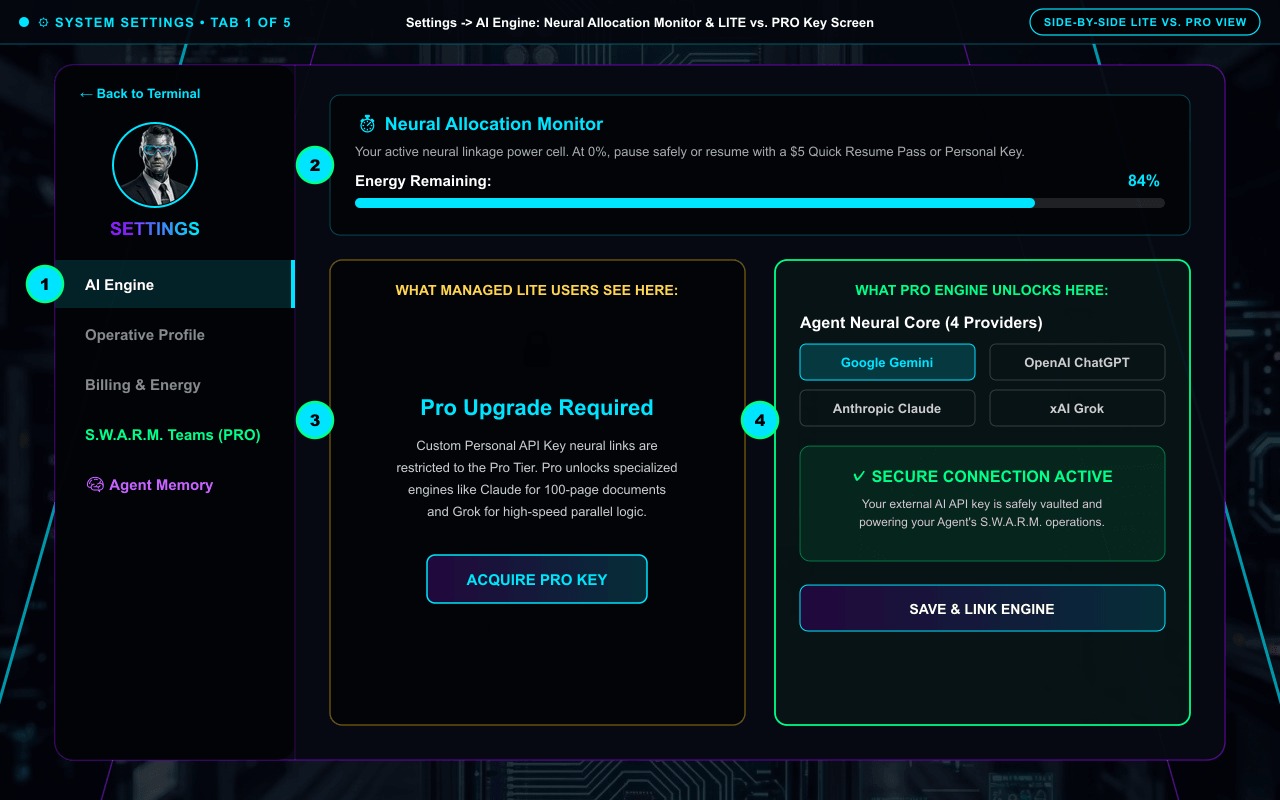
Because ⚙ System Settings contains 5 separate screens (AI Engine, Operative Profile, Billing & Energy, S.W.A.R.M. Teams, and 🧠 Agent Memory), here is the full screenshot walkthrough of every tab — including what Lite users see vs. what unlocks on Pro.
📍 Exact Location in Portal: Click "⚙ System Settings" near the bottom of the left Sidebar.
✦
Tab 1: AI Engine (LITE vs. PRO)
Neural Allocation Monitor (%) + Provider Selector (Gemini, ChatGPT, Claude, Grok) & Personal API Key Vault.
✦
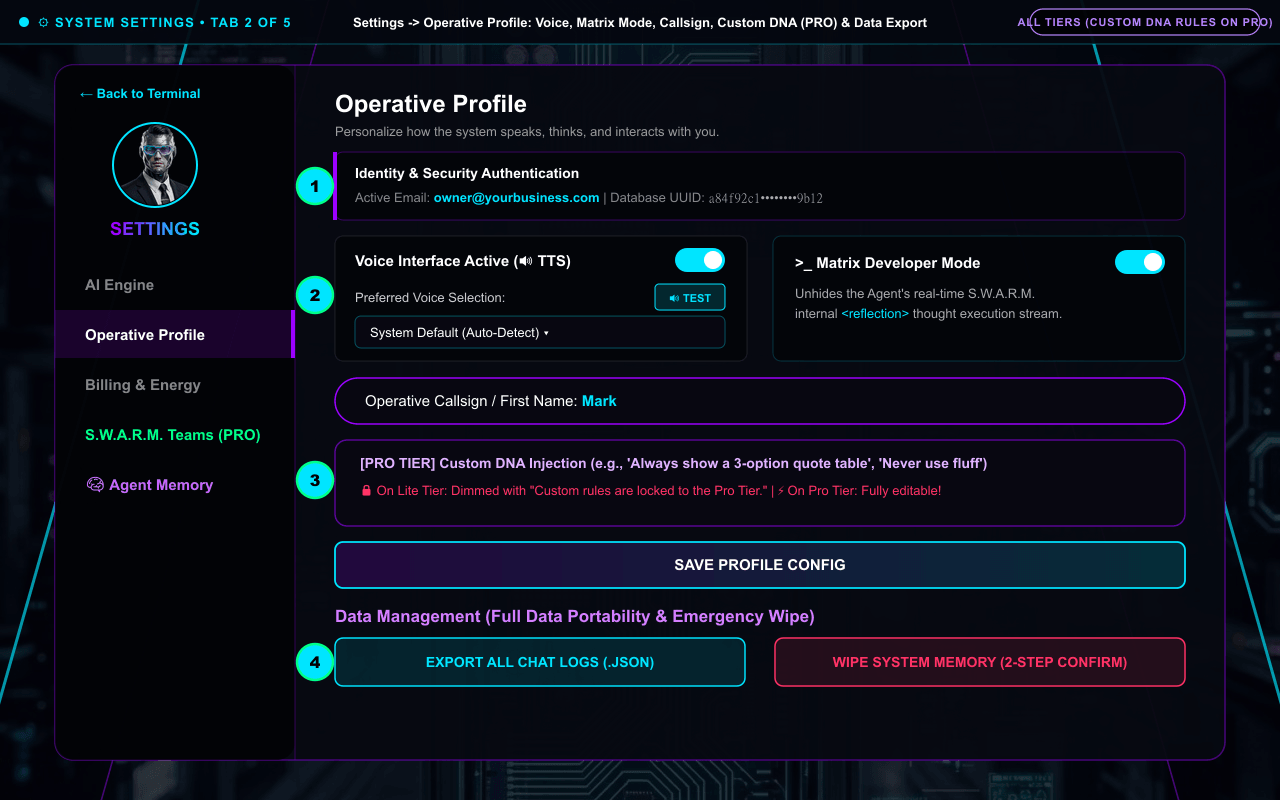
Tab 2: Operative Profile
Email/UUID verification, Voice Interface + TEST button, Matrix Dev Mode, Callsign, Pro Custom DNA, Ikigai & JSON Export/Wipe.
✦
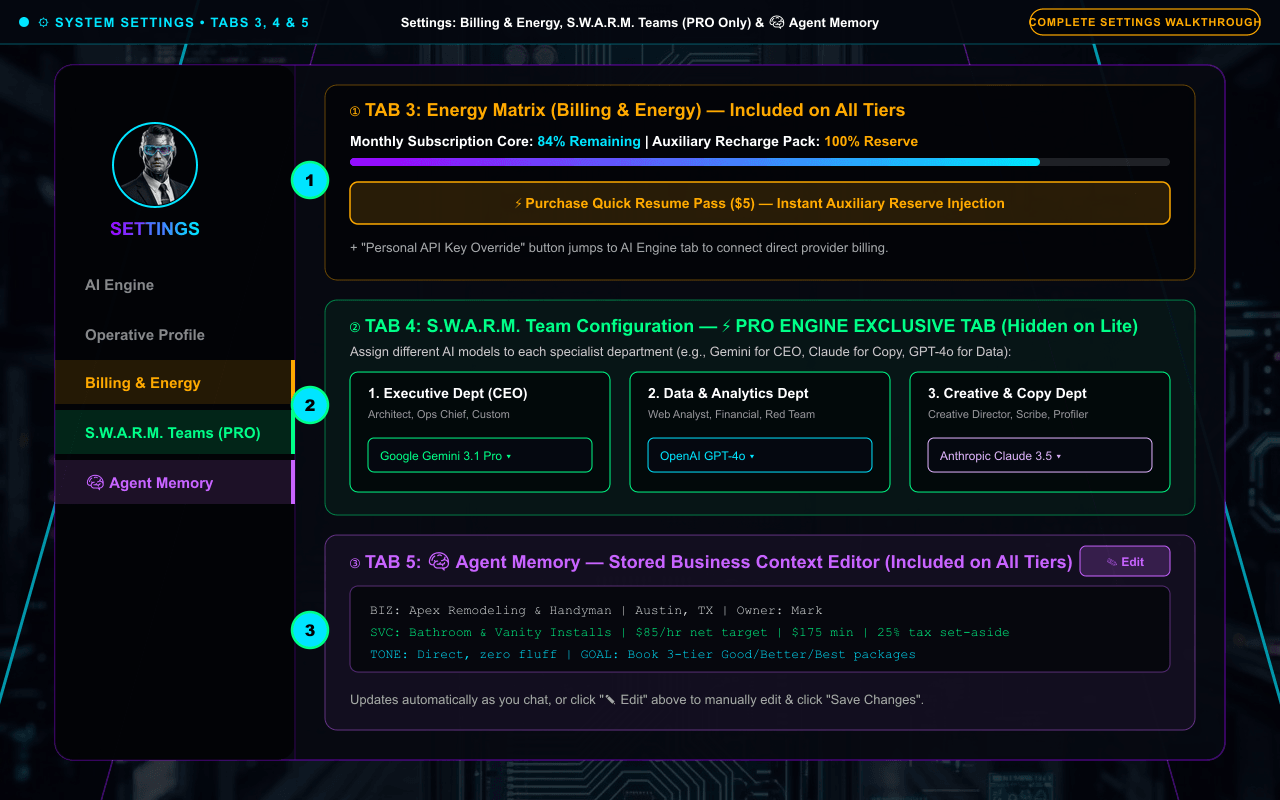
Tab 3: Billing & Energy
Monthly Subscription Core % bar, Auxiliary Recharge Pack % bar + $5 Quick Resume Pass button.
✦
Tabs 4 & 5: S.W.A.R.M. Teams & Memory
Pro 3-Department Model Routing (CEO, Data, Creative) + Visual Stored Business Context Editor.
SCREEN-BY-SCREEN INSTRUCTIONS (NUMBERS ①–④ MATCH THE SCREENSHOT MARKERS)
Screen 1: Settings Tab 1: "AI Engine" — Neural Allocation Monitor & LITE vs. PRO Key Screen
✓ LITE CORE & PRO ENGINE
HOW TO DO IT (MATCHES GREEN NUMBERS ON SCREENSHOT ABOVE):
1Click "AI Engine" in the left Settings navigation.
2Check the top "Neural Allocation Monitor" bar to see your remaining monthly energy percentage (Cyan = healthy, Yellow <= 10%, Red <= 2%).
3Left View (Managed LITE): Shows the "🔒 Pro Upgrade Required" card for multi-provider custom keys.
4Right View (PRO / Personal Key): Select between Google Gemini, OpenAI ChatGPT, Anthropic Claude, or xAI Grok, paste your key, and click "Save & Link Engine" (shows green "✓ SECURE CONNECTION ACTIVE").
Why it works this way: Gives you real-time visibility into your remaining monthly energy and a 1-click way to link or swap external AI brains.
⚡ LITE vs. PRO Upgrade Value: LITE vs. PRO Screen Difference: On Managed Lite accounts, the bottom half of the AI Engine tab displays a "🔒 Pro Upgrade Required — Acquire Pro Key" card explaining that custom multi-provider Personal API Key neural links (like Claude for 100-page PDFs or Grok for high-speed parallel S.W.A.R.M. logic) unlock on Pro!
Screen 2: Settings Tab 2: "Operative Profile" — Voice, Matrix Mode, Callsign, Custom DNA (PRO), Ikigai & Data Export/Wipe
🟢 ALL TIERS ($5 IGNITION • LITE • PRO)
HOW TO DO IT (MATCHES GREEN NUMBERS ON SCREENSHOT ABOVE):
1Top Identity & toggles: Verify your active email/UUID, toggle "Voice Interface Active" (plus choose a voice and click "🔊 TEST"), or toggle "Matrix Developer Mode" (PRO thought stream).
2Update your "Operative Callsign" (first name) or inject "[PRO TIER] Custom DNA" behavioral rules.
3Edit your 4-pillar "Ikigai Compass" and click "Save Profile Config".
4Under Data Management at the bottom, click "Export All Chat Logs (.JSON)" or use the two-step "Wipe System Memory" button.
Why it works this way: Puts all personalization, voice testing, full data portability (.JSON export), and emergency account wipe controls on one screen.
⚡ LITE vs. PRO Upgrade Value: LITE vs. PRO Screen Difference: On Lite, the "[PRO TIER] Custom DNA Injection" box is dimmed with red text ("Custom rules are locked to the Pro Tier"). Upgrading to Pro unlocks custom behavioral rules that override default agent formatting.
HOW TO DO IT (MATCHES GREEN NUMBERS ON SCREENSHOT ABOVE):
1In "Billing & Energy" (Tab 3), view your Monthly Subscription Core % and Auxiliary Recharge Pack %, or click "⚡ Purchase Quick Resume Pass ($5)" for an instant reserve boost.
2In "S.W.A.R.M. Teams" (Tab 4 — Pro Engine Only), assign which AI model (Gemini 3.1 Pro, GPT-4o, Claude 3.5 Sonnet, or Grok) powers your Executive, Data & Analytics, and Creative & Copy departments.
3In "🧠 Agent Memory" (Tab 5 — All Tiers), inspect your Stored Business Context and click "✎ Edit -> Save Changes" to manually update any fact.
Why it works this way: Gives you complete control over your monthly/reserve battery, departmental AI brains, and stored business facts.
⚡ LITE vs. PRO Upgrade Value: The green "S.W.A.R.M. Teams" tab is hidden on Lite Core and unlocks automatically when you activate a Pro Engine license.
🛠️ QUICK TROUBLESHOOTING & PRO TIPS FOR PAGE 7
Why do I see "🔒 Pro Upgrade Required" inside Settings -> AI Engine? Managed Lite Core accounts come pre-configured with our Supplied Google Gemini key; upgrading to Pro Engine unlocks multi-provider Personal API Key switching (Claude, ChatGPT, Grok) and the S.W.A.R.M. Teams tab.
Assigned OpenAI, Claude, or Grok to a department in S.W.A.R.M. Teams? Make sure you also saved a Personal API Key for that provider in the AI Engine tab!
Q: How much monthly AI processing is included in Supplied API Key plans, and how do I cancel or manage billing?
A: $5 Ignition includes ~500,000 words (50+ sessions); Lite Core ($49 setup, then $15/mo) includes ~1.5 million words/mo (150+ sessions); Pro Engine ($149 setup, then $39/mo) includes ~4 million words/mo (400+ sessions & S.W.A.R.M. runs). You can cancel recurring retainers anytime with 1 click at https://whop.com/hub.
Agent Right Hand Official Operator Manual • Technology by WBMB Inc.Page 7 of 10
PAGE 8 • REAL PROCESS DEMO #1 (JOB QUOTING)Category: Step-by-Step Process Demos
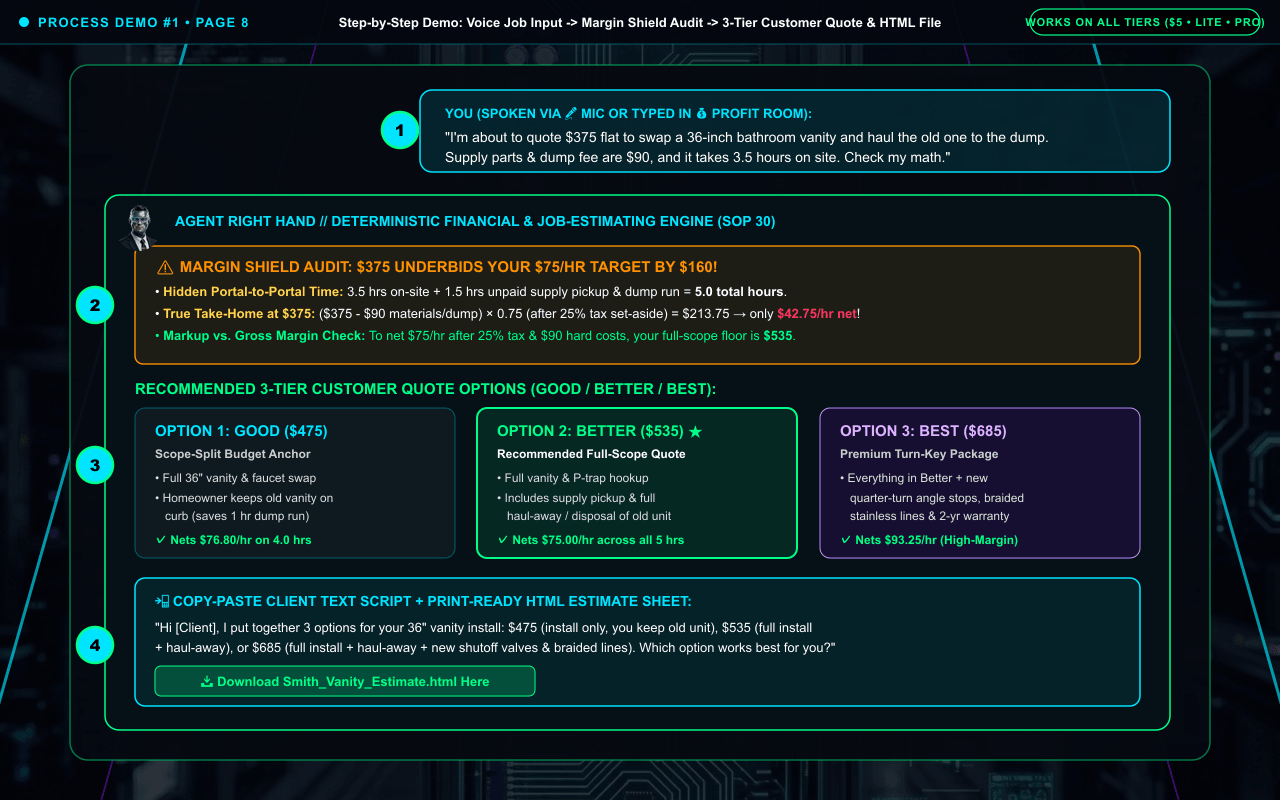
Step-by-Step Demo #1: Pricing a Trade / Service Job & Generating a 3-Tier (Good / Better / Best) Quote
Full-screenshot walkthrough showing how a contractor or service business owner turns a rough 20-second voice note into a profit-protected, 3-tier customer quote and printable HTML estimate sheet.
📍 Exact Location in Portal: 💰 PROFIT Room (or any Operating Room) + 🎤 Voice Mic + 🗂️ File Generator.
✦
Step 1: Speak or Type Rough Job Details
"Swap a 36-inch bathroom vanity, haul away old one, $90 disposal/supply parts, 3.5 hrs on site. Thinking $375."
✦
Step 2: Hidden Cost & Margin Audit
ARH flags 1.5 hrs unpaid supply-house/dump drive time + 25% tax set-aside + Markup vs. Gross Margin.
✦
Step 3: 3-Tier Good / Better / Best Table
Generates $475 (Good / No Haul-Away), $535 (Better / Full Scope), and $685 (Best / Portal-to-Portal + Upgrade).
SCREEN-BY-SCREEN INSTRUCTIONS (NUMBERS ①–④ MATCH THE SCREENSHOT MARKERS)
Screen Walkthrough: Speak or Type Your Job Details -> Review Margin Audit -> Send 3-Tier Quote & Printable HTML Estimate
🟢 ALL TIERS ($5 IGNITION • LITE • PRO)
HOW TO DO IT (MATCHES GREEN NUMBERS ON SCREENSHOT ABOVE):
1Click 🎤 in the PROFIT room and speak your rough job scope ($375 flat idea, $90 parts/dump fee, 3.5 hrs on site).
2ARH runs SOP 30, adds 1.5 hrs unpaid supply/dump drive time and 25% tax set-aside, and warns you that $375 only nets $42.75/hr.
3ARH outputs a 3-Tier Customer Quote Table: GOOD ($475), BETTER ($535), and BEST ($685).
4Copy the client text script or click "[📥 Download Smith_Vanity_Estimate.html Here]" to print/save a clean PDF estimate.
Why it works this way: Standard chatbots say "Sounds like a fair price!" ARH protects you from underbidding before you send the quote.
🛠️ QUICK TROUBLESHOOTING & PRO TIPS FOR PAGE 8
Want ARH to use your exact hourly target, truck minimum, and tax bracket automatically on every future quote? Just tell it once ("Save to my profile: my target net rate is $85/hr with a $175 minimum and 28% tax set-aside").
Q: Why does Agent Right Hand generate downloadable .HTML files when I ask for a PDF estimate or checklist?
A: Styled HTML files open in any mobile or desktop browser with crisp dark-mode or print-ready formatting, and convert to a native PDF in one click by pressing Ctrl+P (or Cmd+P / Share -> Print on phone) and selecting "Save as PDF".
Agent Right Hand Official Operator Manual • Technology by WBMB Inc.Page 8 of 10
PAGE 9 • REAL PROCESS DEMO #2 (COMPETITOR AUDIT)Category: Step-by-Step Process Demos
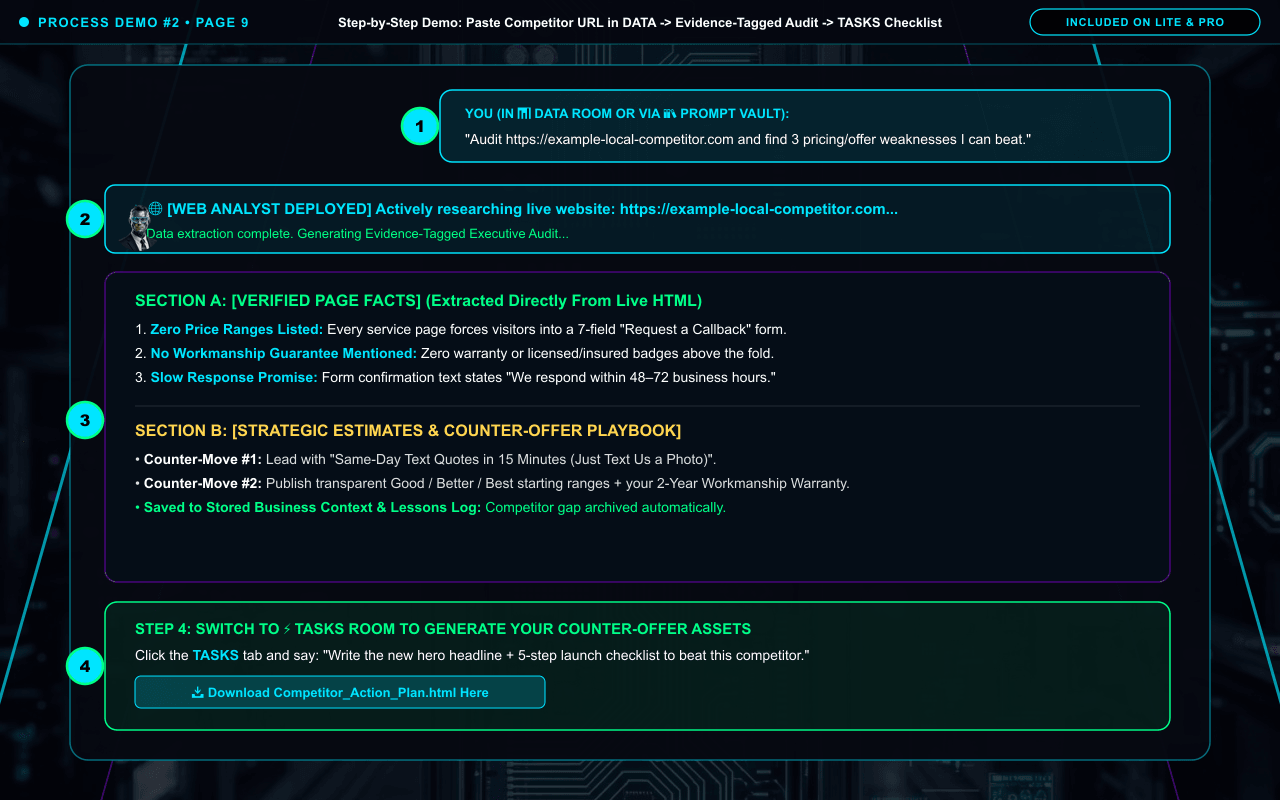
Step-by-Step Demo #2: Auditing a Live Competitor Website & Turning Weaknesses Into an Action Plan
Full-screenshot walkthrough showing how to paste a competitor URL in the DATA room, watch the 🌐 Web Analyst scrape the live site, read the Evidence-Tagged report, and generate an execution checklist in TASKS.
📍 Exact Location in Portal: 📊 DATA Room -> 🌐 Web Analyst Tool -> ⚡ TASKS Room.
✦
Step 1: Paste Competitor URL in DATA
Open 📊 DATA Room or click "📚 Prompt Vault -> Competitor Website Tear-Down" and paste the URL.
✦
Step 2: 🌐 Web Analyst Live Scrape
Server-side Web Analyst fetches the live page text and structure in 10–25 seconds.
✦
Step 3: Evidence-Tagged Audit Report
Clearly separates [VERIFIED PAGE FACTS] from [STRATEGIC ESTIMATES & INFERENCES].
✦
Step 4: Counter-Offer & TASKS Checklist
Switch to ⚡ TASKS to generate your counter-offer copy and downloadable action checklist.
SCREEN-BY-SCREEN INSTRUCTIONS (NUMBERS ①–④ MATCH THE SCREENSHOT MARKERS)
Screen Walkthrough: Paste Competitor URL in DATA -> Read Evidence-Tagged Audit -> Download Action Plan in TASKS
✓ LITE CORE & PRO ENGINE
HOW TO DO IT (MATCHES GREEN NUMBERS ON SCREENSHOT ABOVE):
1Open the 📊 DATA room and paste your competitor’s https:// URL.
2Watch the "> 🌐 [WEB ANALYST DEPLOYED]" banner extract their live website.
3Read Section A ([VERIFIED PAGE FACTS]) and Section B ([STRATEGIC ESTIMATES & COUNTER-OFFER PLAYBOOK]).
4Switch to the ⚡ TASKS room to generate your new hero headline and downloadable HTML checklist.
Why it works this way: Separates verified facts found on the competitor’s live page from strategic estimates so you can exploit real market gaps immediately.
⚡ LITE vs. PRO Upgrade Value: On Pro Engine, you can also launch the 1-click "⚡ Competitor Audit" Command Module directly from the left sidebar.
🛠️ QUICK TROUBLESHOOTING & PRO TIPS FOR PAGE 9
What if a giant marketplace site (like Amazon, Etsy, or Facebook) blocks automated scanning with a security firewall? Simply open that page in your browser, press Ctrl+A to select all text, copy (Ctrl+C), and paste (Ctrl+V) it directly into the DATA room chat.
Q: Why did a website scan time out on Amazon, Etsy, or Facebook?
A: Major marketplaces use anti-bot security firewalls that block automated cloud scanners. This is not an ARH bug — simply open that page in your browser, press Ctrl+A -> Ctrl+C, and paste the text directly into the chat so ARH can analyze it immediately.
Agent Right Hand Official Operator Manual • Technology by WBMB Inc.Page 9 of 10
PAGE 10 • REAL PROCESS DEMO #3 (FILES, BOUNDARIES & VISUAL SUPPORT)Category: Step-by-Step Process Demos
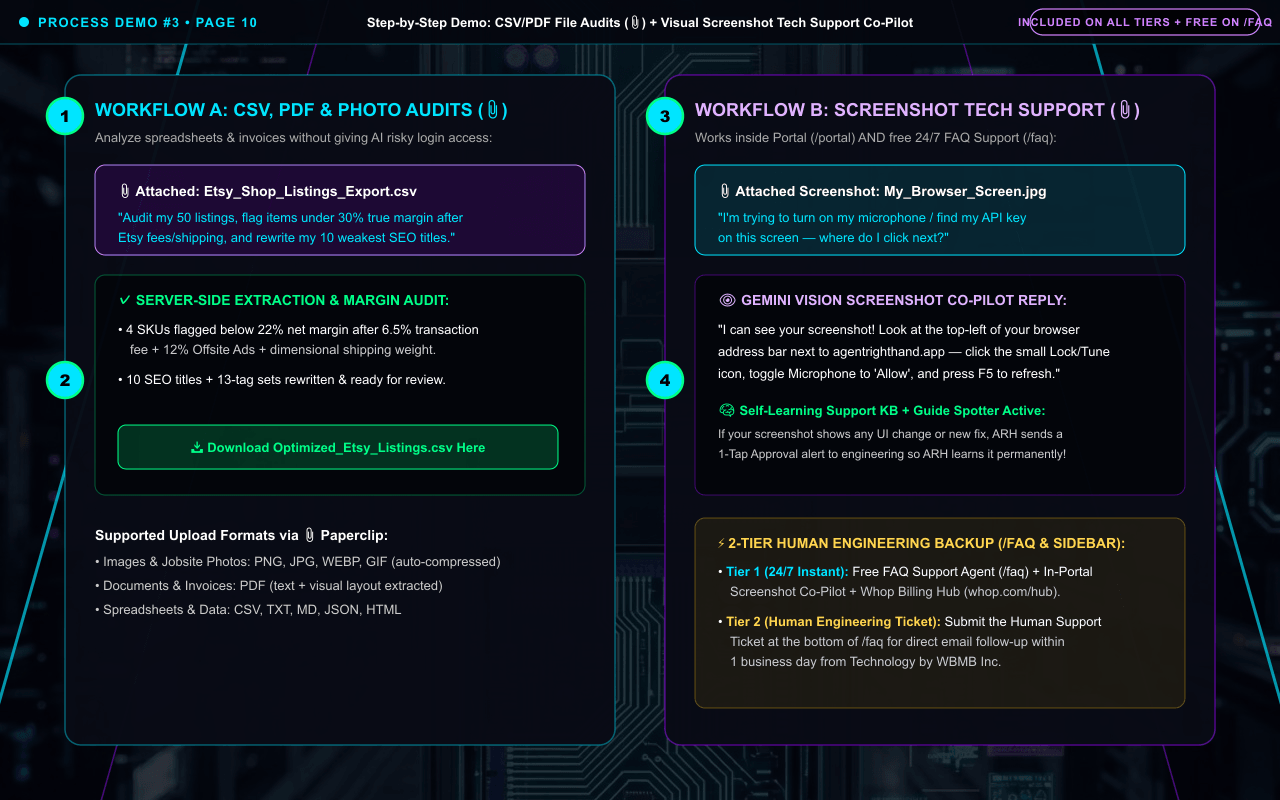
Step-by-Step Demo #3: CSV/PDF File Audits (📎), Master Prompts for 3rd-Party Tools & Visual Screenshot Support
Full-screenshot walkthrough showing how to attach a spreadsheet or PDF via 📎 Paperclip for safe human-in-the-loop auditing, how ARH writes Master Prompts for external video/photo tools, and how to use Screenshot Co-Pilot for tech support.
📍 Exact Location in Portal: 📎 Paperclip Button in Portal (/portal) OR 📎 Attach Screenshot Button in FAQ Support (/faq).
✦
Business File Upload (📎)
Attach a CSV product export, PDF supplier quote, or jobsite photo for instant audit.
✦
Server-Side PDF & CSV Extraction
ARH extracts every row and line item AND inspects visual layout simultaneously.
✦
Screenshot Tech Support Co-Pilot
Stuck on a setting in ARH, Google AI Studio, or Shopify? Attach or Ctrl+V a screenshot.
✦
2-Tier Escalation & Self-Learning
ARH points out what to click, learns new fixes, or escalates to Human Engineering within 1 business day.
SCREEN-BY-SCREEN INSTRUCTIONS (NUMBERS ①–④ MATCH THE SCREENSHOT MARKERS)
Screen Walkthrough: Audit Spreadsheets/PDFs (Workflow A) & Use Visual Screenshot Co-Pilot for Tech Support (Workflow B)
🟢 ALL TIERS ($5 IGNITION • LITE • PRO)
HOW TO DO IT (MATCHES GREEN NUMBERS ON SCREENSHOT ABOVE):
1Left Panel (Business File Upload): Click 📎 in the Portal to upload an Etsy/Shopify CSV, supplier PDF invoice, or jobsite photo.
2Server-Side Extraction: ARH audits every row and line item for margin leaks and writes bulk title/SEO upgrades without requiring risky login access to your shop.
3Right Panel (Screenshot Tech Support Co-Pilot): Whenever you are stuck on any screen in ARH or a 3rd-party tool, attach or paste (Ctrl+V) a screenshot via 📎 in the Portal.
4Instant Resolution & 2-Tier Escalation: ARH points out the exact button to click, permanently learns new fixes, or escalates to Human Engineering follow-up within 1 business day.
Why it works this way: Combines safe human-in-the-loop file auditing with instant 24/7 visual screenshot tech support, automatic self-learning KB updates, and Tier-2 Human Engineering follow-up.
🛠️ QUICK TROUBLESHOOTING & PRO TIPS FOR PAGE 10
Shortcut tip: On Windows, press Win + Shift + S to snip a region of your screen, then click directly inside the ARH chat box and press Ctrl + V to attach the screenshot in 2 seconds.
Q: Why doesn’t ARH log into my live Etsy, Shopify, or bank account directly? ("The Business Coach Principle")
A: Giving any automated AI direct write-access to your live store, bank, or client inbox carries real risk (one hallucinated edit could overwrite live pricing or message clients prematurely). Instead, ARH uses a safer CSV/PDF upload and download workflow so the AI does 95% of the heavy lifting while you review and approve every change.
Q: What if I need something ARH does not render directly (like AI video files, product photo generation, or batch image resizing)?
A: ARH acts as your Master Prompt Architect: because it already holds your Stored Business Context, brand voice, and product specs in memory, it writes the exact, ready-to-paste master prompt for external video/image tools (or recommends free browser-based batch image utilities) and walks you through them step by step.
Agent Right Hand Official Operator Manual • Technology by WBMB Inc.Page 10 of 10
Spotted something on your screen that looks different, or need hands-on help?
Take a quick screenshot and attach it with the 📎 Paperclip button inside your Portal chat or on our 24/7 FAQ Support page. Agent Right Hand will inspect your screen visually, guide you step by step, and automatically alert our engineering team if any part of this guide needs an update.